The calorie tracker that reads your plate.
Snap a photo and get calories and macros in seconds — no scrolling endless food lists. Scan a barcode or nutrition label when you want precision, and review every estimate before it logs.
- Snap a meal photo — AI estimates calories and macros in seconds
- Scan a barcode or nutrition label for packaged foods
- Review and adjust every estimate before it logs
- Track protein, carbs and fat against your daily targets
- Household portions (1 egg, 1 slice) — log by count, not grams
Free to download on iPhone and Android.
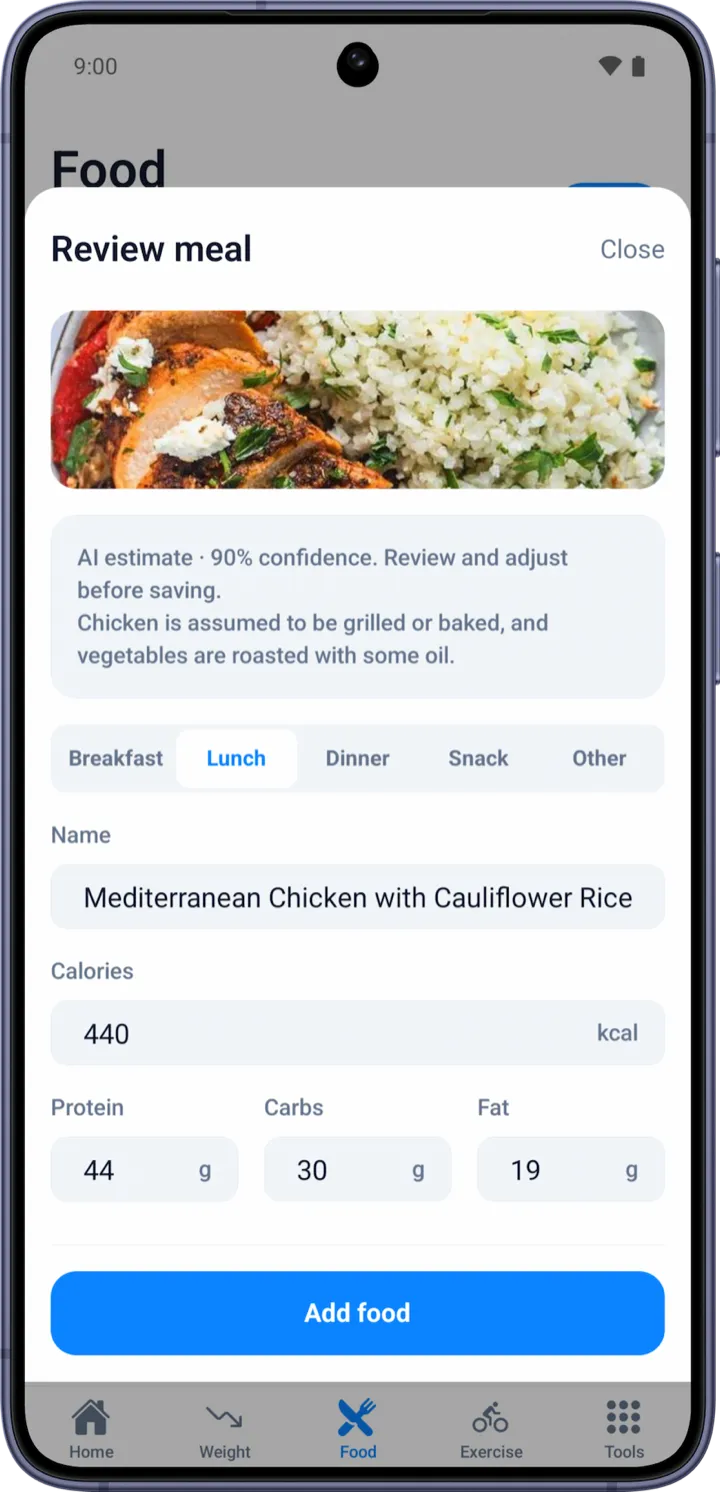
Logging food without the friction.
1 · Snap
Point your camera at the meal. The AI identifies the dish and the individual items on the plate.
2 · Estimate
It returns calories and macros per item and in total, with a confidence level so you know how rough or precise it is.
3 · Adjust & log
Tweak portions if needed and save. The entry lands in your diary and counts toward your daily targets.
Four ways to log, one diary.
AI photo
Best for home-cooked and restaurant meals — snap and go.
Barcode scan
Instant match for packaged products, with serving and per-100g nutrition.
Nutrition-label scan
Photograph the panel and the AI reads it — for products not in any database yet.
Manual & favourites
Add or reuse foods you eat often, so repeat meals take one tap.
Packaged-food data is matched against public sources including Open Food Facts. Photo estimates are AI-generated and always editable. See how to read a nutrition label.
Calorie tracking questions.
How does the AI calorie tracker work?
You take a photo of your meal and the AI identifies the dish and items, then estimates calories and macros per item and in total. You can adjust portions before it logs, so the entry matches what you actually ate.
How accurate is photo calorie tracking?
A photo gives a fast, useful estimate rather than a lab measurement, so each result comes with a confidence level and is fully editable. For packaged food, scanning the barcode or nutrition label is more precise.
Can I scan barcodes and nutrition labels too?
Yes. Scan a barcode to pull up a product, or photograph a nutrition label and the AI reads the panel into calories and macros — useful for foods that are not in any database yet.
Does it track protein and macros, not just calories?
Yes. Every entry breaks down protein, carbs and fat, with daily protein targets — which matters a lot if you are losing weight on a GLP-1 medication and want to protect muscle.
When is the AI calorie tracker available?
It is part of WeightLytic, available now on iPhone and Android (free tier plus an optional Premium tier for the AI features).
Track food the easy way.
Free to download on iPhone and Android.